whatsmybitrate
Audio Bitrate Analyzer

Know exactly
what bitrate
your audio is.

Drop any audio file. Get its true bitrate, codec, sample rate and full frequency analysis — plus a spectrogram of the whole track — in seconds.

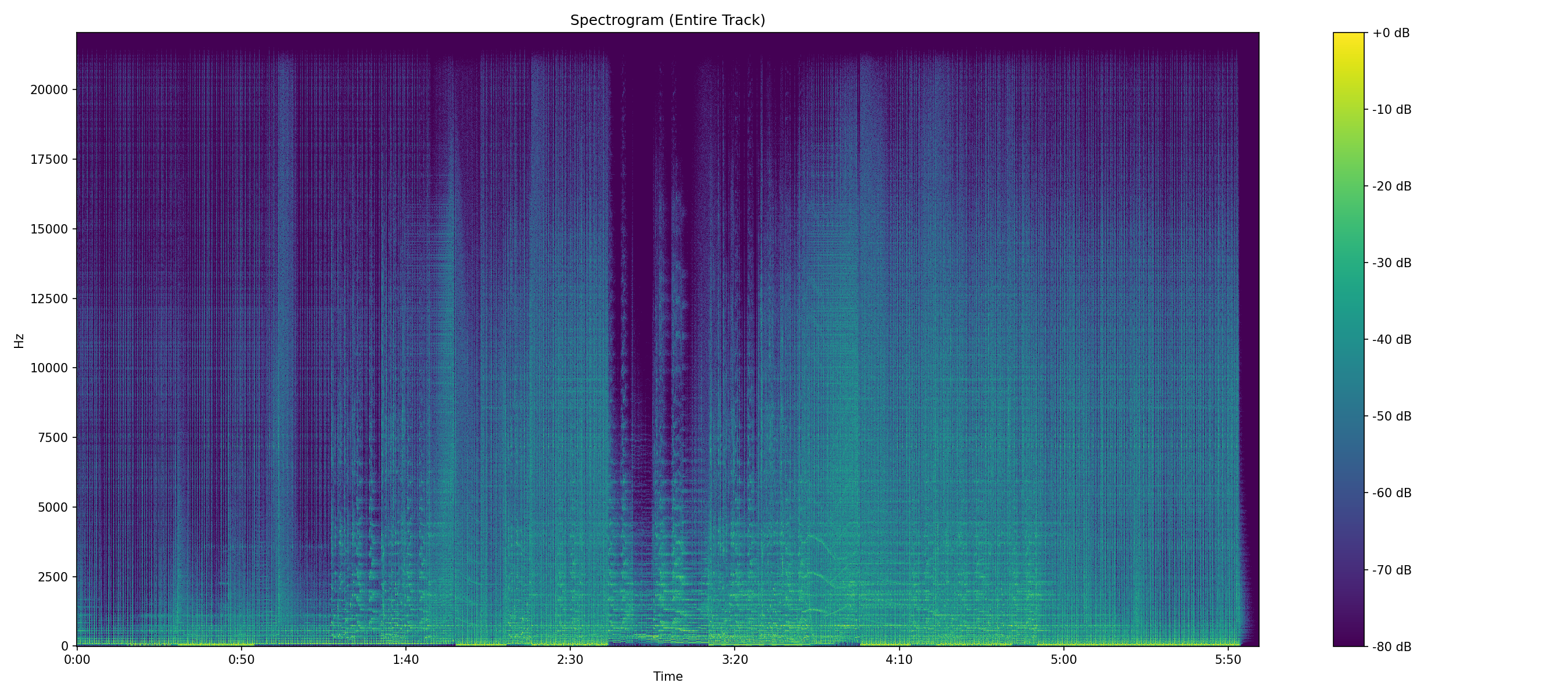
Example spectrogram of an audio file

Example spectrogram — frequency content over time

Analysis Results lossy
File
my_track.mp3
Codec
mp3
Sample Rate
48000
Max Frequency
20516.60 Hz
Nyquist Frequency
24000 Hz
Peak Frequency Ratio
0.855
Bit Rate
320 kbps (Stated)
Estimated Bitrate
LOSSY ~320kbps
Estimated Bitrate Numeric
320
Is Lossless
false
plus full debug log of the analysis

First, the basics

What bitrate actually tells you — and what it doesn't.

Bitrate is how much data describes each second of sound. More data usually means more of the original recording survived. That's the part everyone knows. The part that trips people up is that the number on the label is a claim, not a measurement — a file that was squeezed to 128 kbps and then re-saved at 320 will cheerfully report 320, while carrying the holes the 128 version left behind.

You can't hear that by looking at a filename, and most players won't warn you. The only reliable way to know is to look at the frequencies themselves: where the music stops, and how it ends. That's what the tool below does. Drop a file in and it reads the spectrum, not the sticker.

Analyze your file

Want to find your song's genre through AI audio analysis?

Scan whole files or batches of files — WhatsMyBitrate on GitHub

Worked example

What a fake actually looks like.

Two real analyses. Both files are 44.1 kHz, so both have the same ceiling available to them — 22.05 kHz, the Nyquist limit. One uses all of it. The other threw a quarter of it away before it ever reached you, and no player will tell you that.

Full spectrum lossless
Spectrogram of a genuine lossless 44.1 kHz file, with frequency content extending to the 22 kHz Nyquist ceiling and a ragged upper edge
Peak frequency ~22 kHz Peak/Nyquist ratio ≈ 1.00

Content reaches the top of the chart and stays there. The upper edge is ragged and shifts with the music, and there's still faint energy above the last audible harmonics — that's dither noise, and a genuine file always has it.

Cut off at 16 kHz lossy ~128
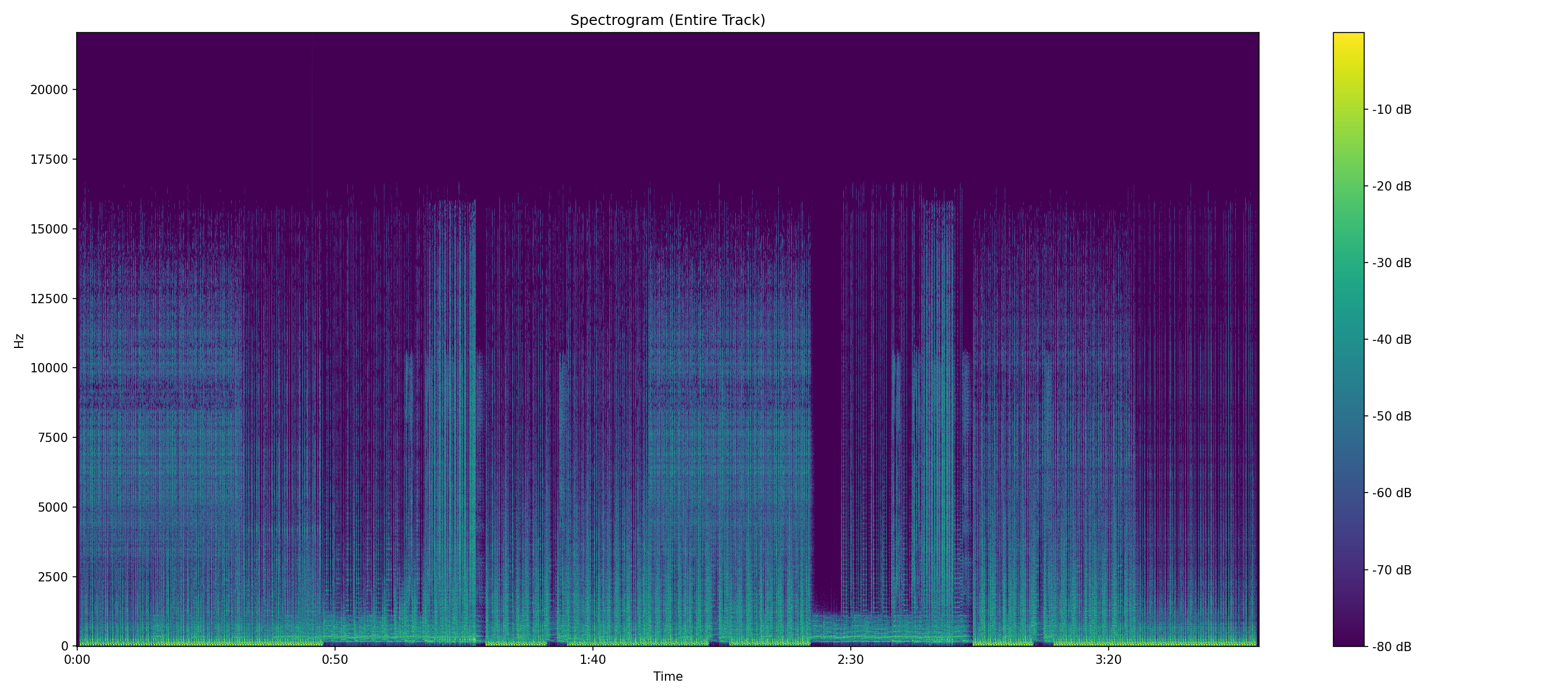
Spectrogram of a lossy 44.1 kHz file showing a hard cutoff at 16 kHz with empty space above it
Peak frequency ~16 kHz Peak/Nyquist ratio ≈ 0.73

A hard shelf at roughly 16 kHz, held for the entire track, with nothing above it — not quiet content, but empty space. Look closely and the line steps up slightly during the busier passages, which is the encoder raising its filter on demand. That's a VBR fingerprint.

How to read the difference

Real music does lose energy as you go up in frequency — that's normal, and it isn't what you're looking for. What matters is how it ends. A natural roll-off fades out gradually over several kHz and wobbles with the material. A lossy cutoff is a straight line that sits at the same frequency all track long. Encoders draw with a ruler; music doesn't.

The catch is that the file on the right can be renamed .flac and it will still look like this. The extension changes; the missing 6 kHz doesn't come back. That's the whole reason this site exists — how to tell if a FLAC is really lossless walks through the rest of the clues. New to reading these charts? How to view a spectrogram covers the axes, the Nyquist ceiling, and the expected cutoff for every format.

How it works

See what your audio is really made of, not just the file extension.

About Whats My Bitrate

Whats My Bitrate is a free online tool that reveals the true quality of your audio files. Whether you're a producer, engineer, podcaster, or simply curious, we surface details like bitrate, codec and sample rate so you can see what's really going on.

Upload your file, and we'll analyze its metadata and frequency content. For a visual twist, we even generate a spectrogram of the full track.

The check is straightforward: we measure where the audio's frequency content actually ends and compare it to the ceiling the sample rate allows (the Nyquist limit). A genuine file uses what it's given; a transcode leaves a hard, ruler-straight cutoff. VBR encoders give themselves away with a cutoff that steps up and down as the music gets busy.

Built by Oren Cohen after one too many "lossless" files that weren't.

What you get

Bitratetrue kbps value
CodecMP3 · AAC · FLAC · WAV…
Sample Rate44.1 / 48 / 96 kHz
Channels & Durationlayout & length
Spectrogramoptional, full track
A spectrogram is a map of how frequency content changes over time — brighter colors mean stronger signals.

Features

Built for producers, engineers, and the curious.

True Bitrate

See the actual bitrate of your file — not what the filename or extension claims it is.

Codec & Sample Rate

Identify the exact codec, sample rate, channel layout and duration of any audio file.

Spectrogram

Visualize your track's full frequency content over time as a color spectrogram.

Private & Fast

Files are processed briefly for analysis, then discarded. Nothing is stored or shared.

Reading Room

Guides to checking your own files.

Guides

How to tell if a FLAC is really lossless

Five clues that separate a genuine lossless file from an MP3 in a FLAC wrapper — and how to read the difference on a spectrogram.

Read more →

Guides

How to tell if a WAV was upscaled

A WAV's size tells you nothing about its quality. Spotting inflated sample rates, padded bit depths, and WAVs made from MP3s.

Read more →

Guides

How to check an MP3's real bitrate

Why 320 kbps on the label doesn't mean 320 kbps of music, and how CBR and VBR muddy the reading.

Read more →

Guides

How to check an AAC or M4A file

An .m4a can be lossy AAC or lossless ALAC — same extension, different worlds. Plus how HE-AAC fakes its high frequencies.

Read more →

Reference

Audio glossary

Bitrate, Nyquist, dither, transcoding, SBR and the rest — defined in plain language, with no marketing attached.

Read more →

Reference

How to view a spectrogram

Nyquist frequency, sample rate, and the peak-to-Nyquist ratio — with a reference spectrogram for every format the analyzer supports.

Read more →

Fundamentals

What is a truly lossless file?

Lossless gets thrown around a lot. Here's what it actually means — and why a FLAC file isn't always what it claims to be.

Read more →

Fundamentals

What are the benefits of lossless audio?

Beyond the marketing: the real, practical reasons lossless is worth caring about (and when it isn't).

Read more →

Listening

Can you tell the difference between lossy and lossless?

The honest answer, the science of ABX testing, and why your brain loves to trick you.

Read more →

Sources

Where can I find lossless audio (legally)?

Streaming services, download stores, and the CDs you forgot you owned — a roundup of legitimate lossless sources.

Read more →

Gear

What type of hardware is best for lossless?

Headphones, DACs, stereo systems, and where your money actually makes a difference.

Read more →

Behind the scenes

How does WhatsMyBitrate work?

A peek under the hood: spectral analysis, Nyquist frequencies, and how we sniff out upscaled files.

Read more →

Behind the scenes

Why is WhatsMyBitrate open source?

It started with a suspicious "FLAC" file. Here's the story behind the tool — and why the code is public.

Read more →
Ready to find
your bitrate?

Upload any audio file. Results in seconds. Free.

Analyze a File — It's Free

Privacy & Disclaimer

Your audio stays yours.

Privacy Policy

We value your privacy. Any audio you upload is processed briefly for analysis, then discarded. We do not store, share, or sell your data.

Read more →

Disclaimer

Results may vary based on source and encoding. We do not guarantee completeness or suitability for any purpose.

Questions

Asked often enough to write down.

Is my audio file uploaded or stored anywhere?

Your file is processed just long enough to run the analysis, then it's deleted. We don't keep a copy, we don't listen to it, and we don't share it. The spectrogram and results exist only for your session.

Why does my file say 320 kbps but still look lossy?

Because 320 on the label is the encoder's target, not what's in the file. A track compressed to 128 and re-encoded at 320 keeps the holes the 128 left. We read the actual frequency content, so the number can't hide a transcode.

What's the difference between CBR and VBR?

CBR uses the same number of bits every second; VBR spends more on busy passages and less on quiet ones. On a spectrogram, CBR holds one steady cutoff while VBR's steps up and down with the music.

Why does my FLAC show up as lossy?

A .flac extension is just a container. Convert an MP3 to FLAC and it will happily call itself lossless — but the missing frequencies stay missing. No container brings them back, and that's exactly what this tool catches.

Is WhatsMyBitrate free?

Yes. Upload a file, get the analysis, no account and no paywall. The project is open source, and the site is kept online with a little advertising.