Guides
How to Tell if a FLAC Is Really Lossless
FLAC is the most abused label in digital audio. Not because the format is bad it's excellent but because the extension is trivially easy to put on a file that doesn't deserve it. Convert a 128 kbps MP3 to FLAC and you get a file that's five times bigger, says FLAC in every player, and sounds exactly as bad as the MP3 you started with. Nothing about the format prevents this. Nothing about your music player will warn you.
Why fake FLACs exist in the first place
A DJ might rip an unreleased track from a set and re-encode it to FLAC, or someone rips a CD in 2006 to 192 kbps MP3 because hard drives were small. Ten years later they want a "proper" library, so they batch-convert everything to FLAC. The files are now lossless in format and worthless in content, and they get uploaded, shared, re-shared, and eventually sold. The rest is malice. Some download stores have been caught selling upscaled files as lossless, and plenty of sellers on secondary marketplaces such as DJ pools don't check what they're passing along.
The one-minute version
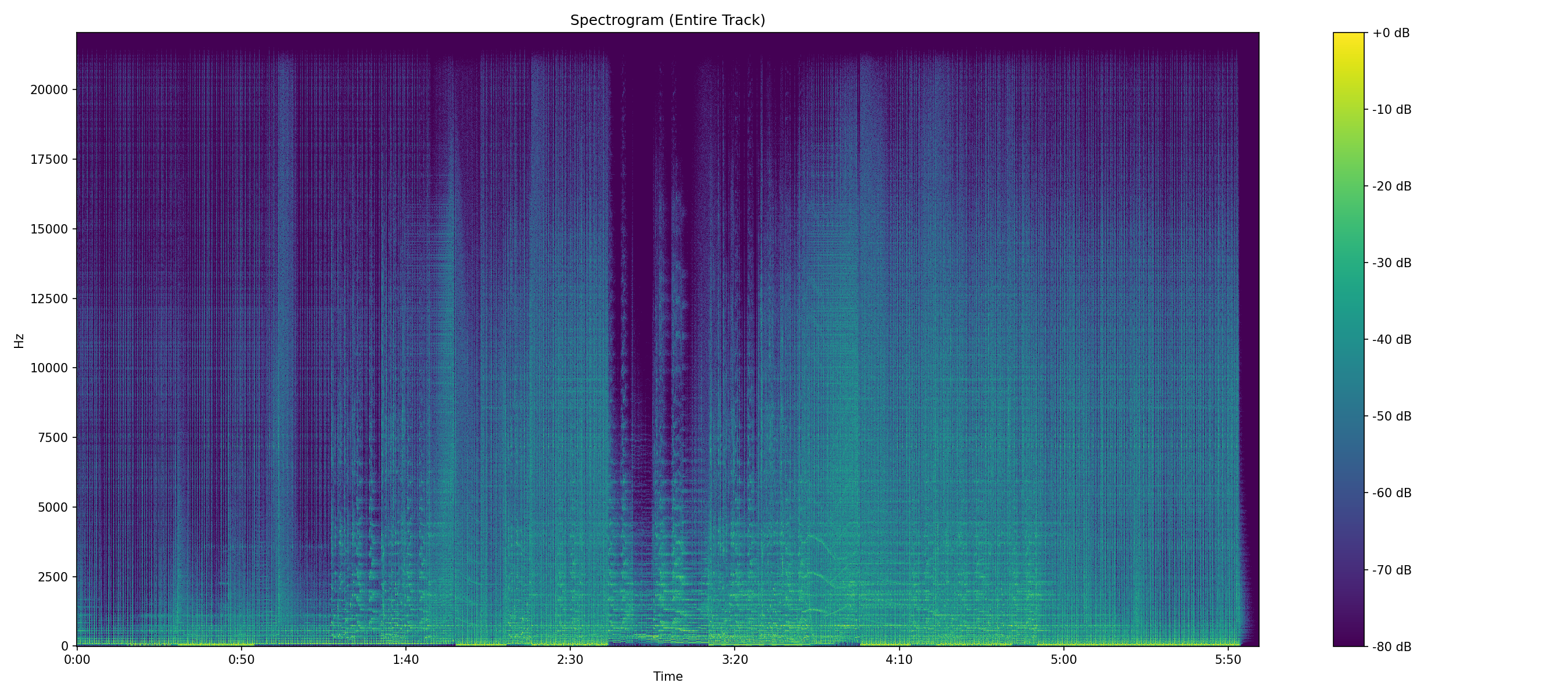
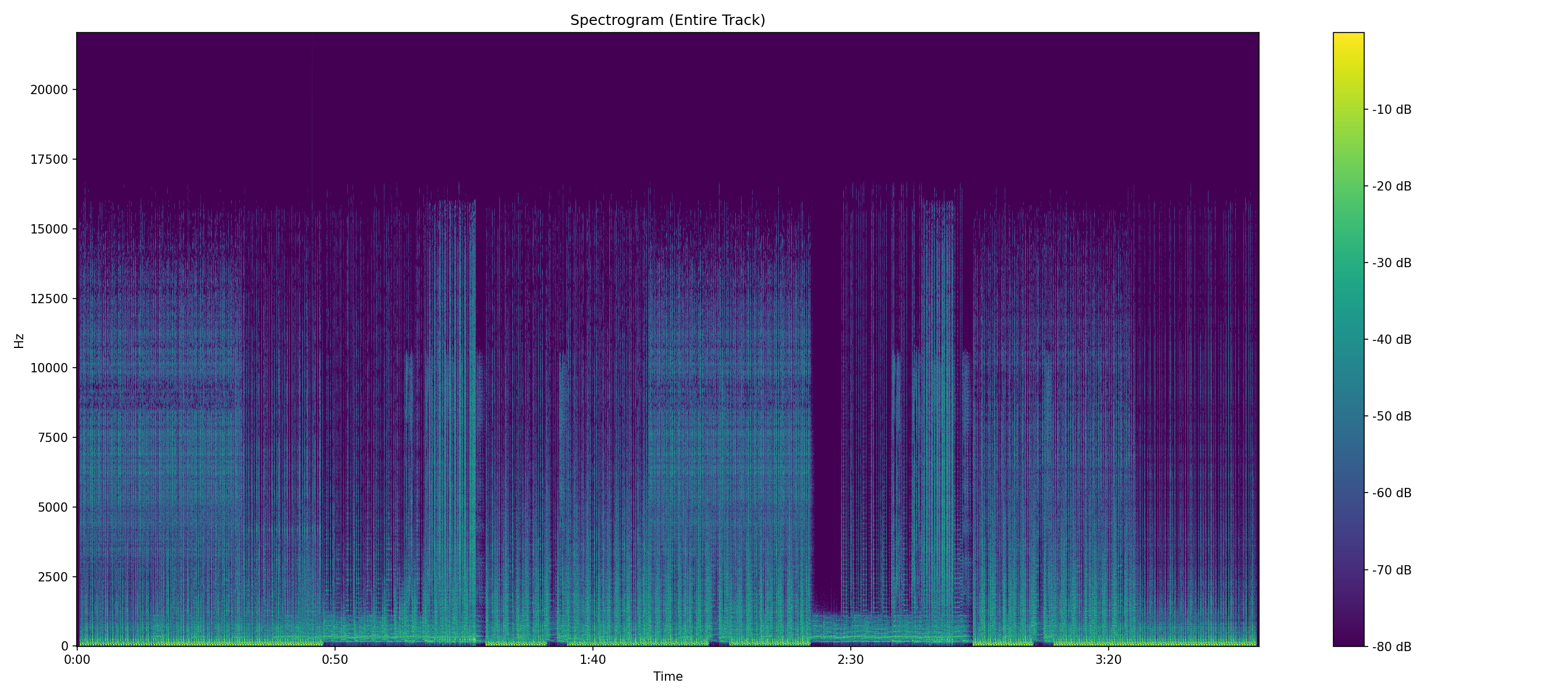
If you want the short answer: look at where the high frequencies stop. Everything else on this page is a supporting clue. A genuine CD-sourced FLAC has content running up to roughly 22 kHz. A FLAC made from an MP3 stops dead somewhere between 15 and 20 kHz, with a flat, empty band above it. That empty band is the whole story.
Clue 1: Where the frequency content stops
CD audio is sampled at 44.1 kHz, which means the highest frequency it can physically represent is half that 22.05 kHz, the Nyquist limit. A real CD rip has something up there. Even in passages where the music itself has no meaningful high-frequency content, the dither noise from the mastering process runs all the way to the ceiling. Lossy encoders throw that away deliberately. High frequencies cost a lot of bits and most people can't hear above 20 kHz anyway, so every encoder applies a lowpass filter and spends the savings elsewhere. Sometimes the original master itself has a gentle low-pass filter around 20 kHz, and the analyzer accounts for that. Typical ceilings:
| Source the FLAC was really made from | Where the spectrum stops |
|---|---|
| 128 kbps MP3 | \~16 kHz |
| 192 kbps MP3 | \~18–18.5 kHz |
| 256 kbps MP3 / AAC | \~19–19.5 kHz |
| 320 kbps MP3 | \~20–20.5 kHz |
| Genuine CD rip | \~22.05 kHz (the Nyquist limit) |
Those numbers are typical, not guaranteed encoders vary and some let you override the filter. But the pattern holds well enough that a file stopping at exactly 16 kHz is telling you something quite specific about its past.
Telling a real roll-off from a transcode
This is the part people get wrong, so it's worth being precise. Real music does lose energy as you go up in frequency that's just how instruments and microphones behave. So seeing less content at the top of the spectrogram is normal. What matters is how it ends. A natural roll-off is gradual and messy. The energy fades out over several kHz, the boundary wobbles with the music, and there's still faint noise above it. A lossy cutoff is a straight line. It sits at the same frequency for the entire track, it doesn't move when the music gets louder or brighter, and above it there is nothing at all not quiet content, but mathematically empty space. Encoders draw with a ruler. Music doesn't. Once you've seen that line a few times you'll spot it instantly, which is the single best argument for generating the spectrogram rather than just reading numbers.
Clue 2: The bitrate is too low
Uncompressed CD audio runs at 1,411 kbps (44,100 samples × 16 bits × 2 channels). FLAC typically squeezes that down to somewhere between 700 and 1,000 kbps, depending on how dense the music is. Sparse acoustic material compresses more; loud, busy mixes compress less. So if a 44.1 kHz stereo FLAC is reporting 450 kbps, something is off. It isn't proof a very quiet solo piano recording can legitimately compress that far but combined with a 16 kHz ceiling it's damning.
Clue 3: It compressed suspiciously well
This one is counterintuitive and it's a personal favorite. FLAC compresses by predicting what the waveform will do next. Lossy encoding has already stripped out the high-frequency detail that makes waveforms hard to predict so a transcoded file is easier for FLAC to compress than a real one. A fake FLAC is often noticeably smaller than its neighbors on the same album at the same length. If one track in a rip is 40% smaller than the rest for no obvious reason, look at that one first.
Clue 4: The hi-res version of the same scam
The other flavor of fake is the 24-bit / 96 kHz "hi-res" file that started life as an ordinary CD. Two independent tells: Upsampling. If a file claims 96 kHz, its Nyquist limit is 48 kHz there's room for content up to 48 kHz. If the spectrum stops cold at 22.05 kHz with a vast empty region above, it was upsampled from 44.1 kHz. Nothing was gained; the file just got bigger. Bit-depth padding. Converting 16-bit to 24-bit adds eight bits of nothing. A genuine 24-bit recording has a noise floor down around −120 dBFS or lower; a padded 16-bit file bottoms out around −96 dBFS, because that's all the resolution the source ever had. The extra bits are literally zeros. Both are worth knowing because hi-res files are sold at a premium, and "bigger file" is not the same thing as "more information." See the WAV guide for more on this, since it's where upsampling shows up most often.
Clue 5: Leftover metadata
Transcoding is usually lazy, and lazy leaves fingerprints. Tags mentioning LAME, Xing, an encoder version string from an MP3 encoder, or a comment field referencing a bitrate have no business being in a file that came off a CD. None of this is conclusive on its own tags can be edited or stripped but finding an MP3 encoder name inside a "lossless" file is not a coincidence.
What the cutoff usually tells you about the source
Once you've found a flat cutoff, you can often make an educated guess about what the file was before it became a FLAC, because different lossy codecs leave different signatures. MP3's lowpass follows its bitrate ladder (the table above), so a shelf at 16 kHz points at a low-bitrate MP3 almost every time. AAC cuts higher for the same bitrate an iTunes Plus 256 kbps AAC typically reaches around 19–20 kHz, so a shelf in that region on a download-store file is more consistent with AAC than with a 320 kbps MP3. Ogg Vorbis is the outlier: at higher quality settings it can leave content above 20 kHz, so the cutoff test alone can't always catch a Vorbis transcode. That's when the other clues matter more bitrate, compression ratio, and the shape of the noise floor. And if the source went through two lossy codecs on its way to you (an MP3, then a streaming service's AAC, then a rip), the spectrogram shows the lower of the two ceilings, sometimes with faint artifacts of the second encoder's band-splitting on top. The practical takeaway: a cutoff doesn't just say "fake." It often says "fake, and here's the kind of file it was laundered through."
Frequently asked questions
Can a fake FLAC be fixed? No. The information the lossy encoder discarded is gone, and re-encoding the file at a higher bitrate or converting it to a different lossless format restores nothing. The only fix is re-sourcing the track from a genuine CD, vinyl, or a verified lossless store. Does a real FLAC always reach 22 kHz? Almost always, but there are legitimate exceptions. Some modern masters are low-passed deliberately during production, some live recordings used bandwidth-limited microphones, and a few converters filter aggressively at the top. Content barely reaching 21 kHz with a ragged edge can still be genuine that's why the shape of the edge matters more than the exact number, and why a verdict should weigh all the clues together rather than any one in isolation. What about MQA? MQA is its own rabbit hole: it folds high-frequency content into noise below the audible band and requires a licensed decoder to "unfold." An MQA file analyzed as plain PCM will look unusual a raised noise floor in the top octave is the giveaway. Whether that constitutes "really lossless" is a debate the format's collapse made mostly academic, but if you see that noise signature, now you know what you're looking at. My FLAC came from a major store. Should I still check it? Yes stores mostly sell what labels deliver, and labels have shipped upscaled masters more than once. Qobuz famously discovered and refunded a batch of fake hi-res titles. Checking purchases isn't paranoia; it's the only quality control in the chain that answers to you.
What a clean result actually looks like
A real 44.1 kHz FLAC should show a measured peak frequency close to 22 kHz, a peak-to-Nyquist ratio near 1.0, a bitrate in the 700–1,000 kbps range, and a spectrogram whose top edge is ragged rather than ruled. Get all four and you can stop worrying about that file. WhatsMyBitrate checks the first three automatically and renders the fourth if you tick the spectrogram box. The exact thresholds it uses are published on the about page, and every result comes with a debug log showing how the verdict was reached so if you disagree with it, you can see exactly where it came from.
The verdict
A FLAC file is a promise, not a guarantee. The container tells you how the data is stored; it says nothing about where the data came from. Check the spectrum, sanity-check the bitrate, and be suspicious of anything that looks too small or too neat. And if you find fakes in your library , the useful move is to note which source they came from. Bad rips travel in packs. Unfamiliar with a term here? The audio glossary covers Nyquist, dither, transcoding, and the rest in plain language.
Check a FLAC right now
Upload the file and see its measured peak frequency, real bitrate, and full-track spectrogram in seconds. Free.
Analyze a File