Guides
How to Check an MP3's Real Bitrate
# How to Check an MP3's Real Bitrate
True 320 kbps CBR (constant bitrate) MP3s are about as close as lossy audio gets to lossless as discussed in Can You Tell the Difference, they're nearly indistinguishable from the real thing. So how do you check whether an MP3 is genuinely 320 kbps? Right-click the file, check properties, and your operating system will happily tell you it's 320 kbps. That number is real in the sense that the file genuinely spends 320 kilobits on every second of audio. It's misleading in the sense that it says nothing about how good those 320 kilobits are. Take a 128 kbps MP3 and re-encode it at 320. The result is a 320 kbps file. It's also a bigger, worse copy of a 128 kbps file, every artifact preserved in loving high-bitrate detail, plus a fresh round of its own. This happens constantly, and the file label will never tell you.
Stated bitrate versus real quality
These are two different questions and it's worth keeping them separate: Stated bitrate is how many bits per second the file uses. It's read from the frame headers or averaged across the file. It's a fact about storage. Real quality is how much audio information survived. It's a fact about the audio, and the only way to get at it is to decode the file and measure what's actually in there. For a file encoded once from a lossless source, the two line up nicely. For a file with a history, they can diverge wildly and files with histories are the norm.
CBR, VBR, ABR and why the header can mislead
MP3 comes in three flavors, and confusion between them causes a lot of false alarms: CBR (constant bitrate) spends the same bits on every frame, whether it's a drum fill or silence. Simple, slightly wasteful, and the bitrate reported is honest. VBR (variable bitrate) spends bits where the music needs them. A quiet passage might drop to 100 kbps; a dense one might spike to 320. You get better quality per megabyte, which is why LAME's V0 preset is a sensible default for most people. ABR (average bitrate) varies within a target, splitting the difference. Here's where it gets messy. A VBR file has no single bitrate, so something has to be summarized. Well-made VBR files carry a Xing or LAME header at the front containing the frame count, which lets a player compute the true average. If that header is missing or corrupted, very common in files that have been split, tagged badly, or passed through sloppy software players fall back to reading the first frame and reporting that as the bitrate for the whole file. If the track opens with two seconds of near-silence, your 245 kbps VBR file will confidently report 96 kbps. So before assuming you've found a bad file: check whether it's VBR, and check whether the reported number is an average or a guess from frame one.
The measurement that can't be faked
Metadata is editable. The spectrum isn't. Every MP3 encoder applies a lowpass filter. It discards high frequencies because they're expensive in bits and most people can't hear them and where it places that filter is a direct function of the bitrate it was given.
| Encoded at | Typical lowpass |
|---|---|
| 96 kbps | \~15 kHz |
| 128 kbps | \~16 kHz |
| 192 kbps | \~18–18.5 kHz |
| 256 kbps | \~19–19.5 kHz |
| 320 kbps | \~20–20.5 kHz |
| LAME V0 (VBR) | \~19.5 kHz |
And critically: re-encoding never puts those frequencies back. Once the 128 kbps encoder has cut everything above 16 kHz, that content is gone. Feed the result to a 320 kbps encoder and it will faithfully preserve the 16 kHz ceiling it was given. The file is 320 kbps with a 128 kbps spectrum, and that mismatch is the fingerprint.
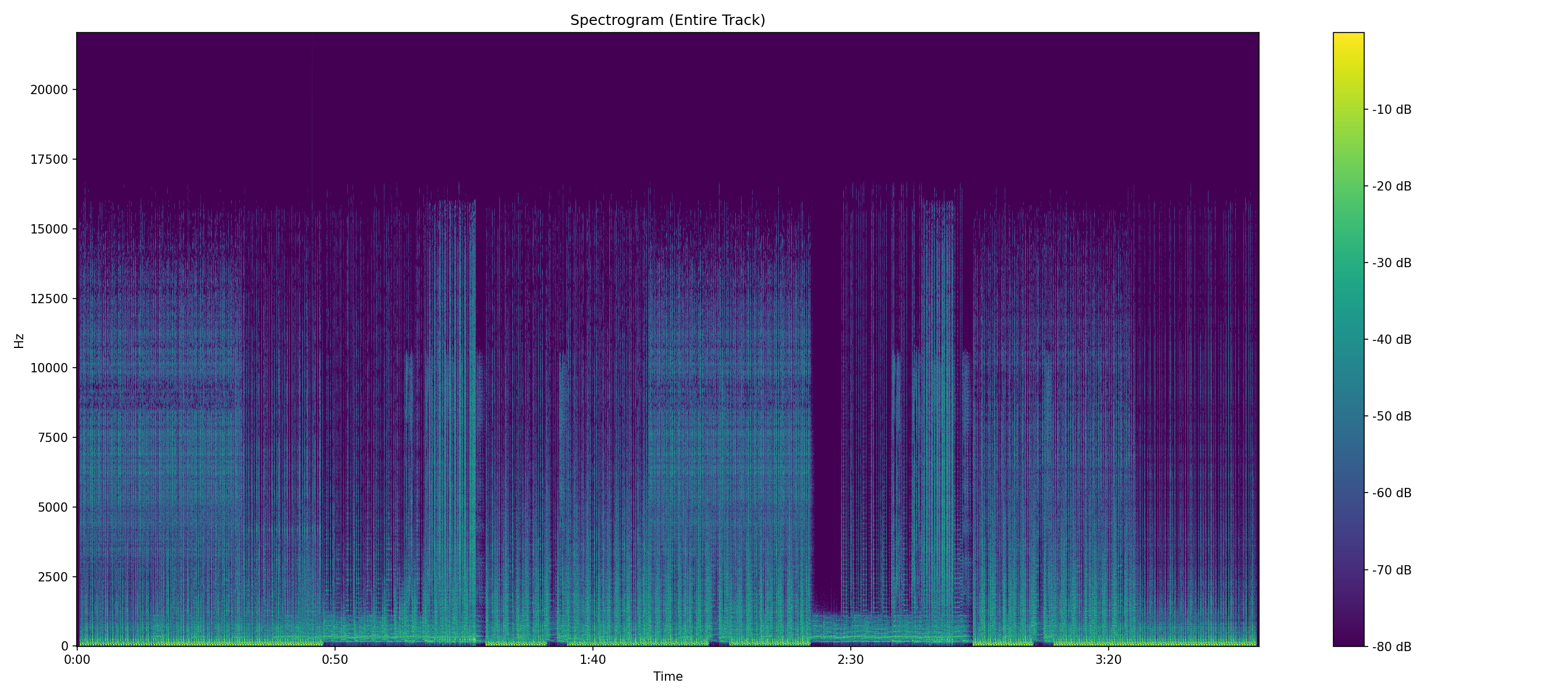
That step is worth pointing out, because it's a second piece of information the spectrogram hands you for free. A CBR file's cutoff is dead level from start to finish; the encoder has the same budget every frame, so the filter never moves. A VBR file's cutoff nudges upward on dense material and settles back down on quiet passages, exactly as the bit budget rises and falls. If the line has a staircase quality to it, you're looking at VBR.
Reading the result
Put the stated bitrate next to the measured ceiling and one of three things is true: They agree. A 320 kbps file cutting off around 20 kHz is exactly what it says. Nothing to see here. Stated is much higher than measured. A 320 kbps file cutting off at 16 kHz was upscaled from something worse. You're storing 2.4 MB per minute of 128 kbps audio. Stated is lower than measured. Usually a VBR header problem rather than a real finding see above.
The honest caveats
Two situations produce a low ceiling with no wrongdoing involved. First, source material that genuinely has no high-frequency content: a lot of pre-1970s recordings, AM radio transfers, some spoken word, certain lo-fi productions. There's nothing above 16 kHz because there was never anything above 16 kHz. Analog tape rolls off on its own a well-preserved 1965 master tape might genuinely top out around 15–18 kHz depending on the tape speed and format it was recorded on, and an honest transfer of it will show exactly that ceiling without any lossy encoder ever touching it. Second, deliberate mastering choices. Some engineers filter aggressively, either to tame sibilance and cymbal harshness or because the target format (vinyl, broadcast) rewards it. It's uncommon, but it happens, and it's not a scam when it does. A third edge case sits in the other direction: an MP3 that reaches unusually high. Some encoders and some command-line settings push the lowpass above the defaults, and Fraunhofer's own encoder behaves differently from LAME. An outlier number on its own proves nothing the pattern across a whole album is far more informative than any single track. This is exactly why the spectrogram is worth generating rather than trusting a single number. A lossy cutoff is a hard horizontal line, identical for the entire track, with nothing above it. A quiet recording just has a dim top end that still breathes with the music. They look nothing alike once you've seen both.
A quick sanity check on file size
For CBR you can verify the stated bitrate with arithmetic. Bitrate in kbps × duration in seconds ÷ 8 gives you kilobytes. A four-minute 320 kbps track should be about 9.6 MB. If it's 4 MB, the file is not 320 kbps CBR no matter what the header says it's VBR, or it's been re-tagged, or it's truncated.
What different bitrates actually sound like
Numbers on a table are abstract, so it's worth connecting them to what reaches your ears. At 96 kbps and below, the artifacts are obvious on almost any material: cymbals splash and smear, stereo width collapses, and busy passages take on a watery, phasey quality that's unmistakable once you've heard it. At 128 kbps the bitrate that built the download era casual listening is fine but acoustic instruments and reverb tails turn slightly artificial. 192 kbps is where most people stop being able to tell in blind tests on most material, and 256–320 kbps and LAME V0 are transparent for nearly everyone on nearly everything, including trained listeners with good gear. The audible differences that remain at that level live in a handful of pathological test signals harpsichord, castanets, certain electronic textures that encoders handle worst. The practical conclusion cuts both ways: a genuine 320 kbps MP3 is a perfectly respectable archive for listening, so a file being lossy isn't automatically a problem. The problem is paying lossless prices, or spending lossless storage, on audio that quietly isn't.
Why a low bitrate isn't always a mistake
Context matters more than the number. A 128 kbps podcast is a reasonable choice; speech has almost no energy above 8 kHz, so the lowpass costs nothing. DJ pools distribute 320 kbps files because club systems are loud and unforgiving. Streaming services land around 96–256 kbps depending on tier because they're optimizing for bandwidth, not archival. Where a low measured bitrate becomes a red flag is mismatched expectations: a "320 kbps" purchase that measures 160, a vinyl rip that turns out to be a YouTube transcode underneath, or a whole album where one track has a different ceiling than the rest which usually means that track came from a different source than the others, and someone in the chain knew it.
Frequently asked questions
Is V0 better than 320 CBR? On most materials they measure and sound essentially identical; V0 just spends fewer bits getting there. Some very old hardware players choke on VBR files, which is the only remaining reason to prefer CBR. Why does my player show a different bitrate than the analyzer? Because players report the header value and an analyzer measures the decoded audio. For well-formed CBR files they agree; for VBR files, or files with damaged headers, they can differ a lot and the measured number is the one describing what's actually in the file. Can I trust the bitrate shown in a file manager? For storage purposes, yes. For quality purposes, no, that's the entire distinction this article exists to make. The file manager tells you what the label says; only the spectrum tells you what the label means. What's the best bitrate to rip my own CDs at? If storage is cheap and the rips are archival, rip to FLAC and skip lossy entirely. If you need MP3 for compatibility, LAME V0 or 256–320 kbps CBR are transparent on all but the most pathological material. Anything above 320 doesn't exist in the format MP3 tops out there.
The verdict
The bitrate on an MP3 is a spending figure, not a quality figure. It tells you how many bits the file uses; the spectrum tells you what it bought. Most of the time they match. When they don't, the spectrum is the one telling the truth. Run the file through the analyzer it reports the stated bitrate and the measured estimate side by side precisely so you can see when they disagree. CBR, VBR, lowpass, joint stereo, and the rest are defined in the audio glossary.
Check an MP3 right now
Upload the file and see its stated bitrate next to the bitrate its spectrum actually supports. Free.
Analyze a File